Saturday, March 5, 2011

Manusia dan Keindahan

Keindahan menyangkut kesatuan (unity), keselarasan (harmony), kesetangkupan (symmetry), keseimbangan (balance), dan pertentangan (contrast). Manusia tidak dapat dipisahkan dengan sesuatu yang disebut dengan keindahan karena manusia memilikki nafsu, akal, hati, ruh, dan sirri (rahasia ilahi). Dengan akal, manusia memiliki keinginan-keinginan yang menyenangkan dalam ruang renungnya, dengan melakukan kontemplasi yaitu suatu proses bermeditasi merenungkan atau berpikir penuh dan mendalam untuk mencari nilai-nilai, makna, manfaat dan tujuan atau niat suatu hasil penciptaan.
 
Akal dan budi merupakan kekayaan manusia tidak dimiliki oleh makhluk lain. Dengan akal dan budi manusia memiliki kehendak atau keinginan untuk menciptakan kehidupan yang menyenangkan, yang memuaskan hatinya. Dengan adanya keinginan-keinginan tersebut, manusia menggunakan nafsunya untuk mendorong hasrat atau keinginan yang dipikirkan atau direnungkan oleh akal tadi agar bisa terrealisasikan. Ditambah lagi dengan anugrah yang diberikan-Nya kepada kita (manusia) yakni berupa hati, dimana dengan hati ini manusia dapat merasakan adanya keindahan, oleh karena itu manusia memiliki sensibilitas esthetis. Selain itu manusia memang secara hakikat membutuhkan keindahan guna kesempurnaan pribadinya. Tanpa estetika manusia tidak akan sempurna, Karena salah satu unsur dari kehidupan adalah estetika. Sedang manusia adalah mahluk hidup, jadi dia sangat memerlukan estetika ini

Alasan Manusia Menciptakan Keindahan
Keindahan itu pada dasarnya adalah alamiah. Alam ciptaan Tuhan. lni berarti bahwa keindahan itu ciptaan Tuhan. Alamiah artinya wajar, tidak berlebihan tidak pula kurang. Alasan atau motivasi dan tujuan seniman menciptakan keindahan:

1. Tata nilai yang telah usang
Tata nilai yang terjelma dalam adat istiadat ada yang tidak sesuai lagi dengan keadaan, sehingga dirasakan sebagai hambatan yang merugikan dan mengorbankan nilai-nilai kemanusiaan , misalnya kawin paksa, pingitan, derajat wanita lebih rendah dari derajat laki-laki.

2. Kemerosotan Zaman
Keadaan yang merendahkan derajat dan nilai kemanusiaan ditandai dengan kemerosotan moral. Kemerosotan moral dapat diketahui dari tingkah laku dan perbuatan manusia yang bejat terutama dari segi kebutuhan seksual. Kebutuhan seksual ini dipenuhinya tanpa menghiraukan ketentuan-ketentuan hukum agama dan moral masyarakat.

3. Penderitaan manusia
Manusialah yang membuat orang menderita sebagai akibat nafsu ingin berkuasa, serakah, tidak berhati-hati dan sebagainya. Keadaan demikian ini tidak mempunyai daya tarik dan tidak menyenangkan karena nilai manusia telah diabaikan dan dikatakan tidak indah. Yang tidak indah itu harus dilenyapkan karena tidak bermanfaat bagi kemanusiaan.

4. Keagungan Tuhan
Keagungan Tuhan dapat dibuktikan melalui keindahan alam dan keteraturan alam semesta serta kejadian-kejadian alam. Keindahan alam merupakan keindahan mutlak ciptaan Tuhan. Manusia hanya dapat meniru saja keindahan ciptaan Tuhan itu. Seindah-indah tiruan terhadap ciptaan Tuhan, tidak akan menyamai keindahan ciptaan Tuhan itu sendiri.

Thursday, March 3, 2011

Apple Memperkenalkan IPAD 2

Apple akhirnya memperkenalkan generasi penerus dari iPad. Steve Jobs, CEO dari Apple secara langsung memperkenalkan iPad 2 pada press conference yang berlangsung di San Francisco. "Kami pikir 2011 akan menjadi tahun bagi iPad 2," ujar Steve Jobs pada acara tersebut.

Dari segi fisik fisik, iPad 2 masih mirip dengan iPad original namun terdapat beberapa perubahan. iPad 2 memiliki berat 1.3 pounds, lebih ringan dibanding iPad pertama yang memiliki berat 1.5 pounds. iPad 2 juga 33% lebih tipis dibanding generasi sebelumnya (8.8mm vs 13.4mm), juga lebih tipis dibandingkan dengan iPhone 4. Daya tahan baterai iPad 2 mencapai 10 jam. Perangkat ini juga memiliki kamera di depan dan di belakang, termasuk aplikasi FaceTime dan PhotoBooth yang sudah terdapat di dalamnya. iPad 2 tersedia dalam dua pilihan warna yaitu hitam dan putih (fascia) dan dalam dua versi : WiFi saja dan 3G.

Perubahan tidak hanya sampai di situ, spesifikasi berikut akan memanjakan para iOS gamer. iPad 2 menggunakan CPU baru yang disebut A5, yang memiliki dua inti prosesor yang mampu meningkatkan grafis yang dihasilkan. GPU yang digunakan pada A5 adalah PowerVR SGX543 yang mampu mendorong 35 juta poligon per detik pada 200 MHz dan satu miliar pixel per detik. Apple mengklaim kinerja grafis pada iPad 2 mampu mencapai 9 kali lebih cepat dari iPad original. Sensor gyroscope juga dimasukkan ke dalam perangkat ini. Juga terdapat HDMI-out untuk menggunakan iPad pada layar televisi sampai dengan 1080p. Kabel ini dijual terpisah dengan harga $39.

Sedikit Tips Mencegah Worm

 Sedikit tips buat mengatasi Virus Worm kalo kena...

Tips Mengatasi Virus Worm

Bila komputer anda terserang virus jenis WORM ( yang anda terima melalui EMAIL atau INTERNET), virus ini akan segera menyebar kembali dengan cara mengirim EMAIL ke semua alamat yang ada pada ADDRESS BOOK anda.

Cara mudah untuk pencegahan penyebaran virus ini:

Pada Outlook Express :

1. Klik File pilih NEW -> CONTACT.
2. Pada menu name di kolom FIRST dan LAST NAME ketik "0000" ( nol nol nol nol ).
3. JANGAN mengisi ALAMAT EMAIL apapun, biarkan kosong.
4. Lalu Klik OKE.
5. Pastikan bahwa Alamat Email yang baru ini ada pada URUTAN PERTAMA.(dikolom contact sebelah kiri, 0000 0000 ada di paling atas)
6. Selesai.

Pada Eudora :

1. Klik Tools -> Address Book ( tekan Ctrl dan L bersamaan )
2. Klik New .
3. Pada kolom First Name isi 0000 dan di kolom Last Name isi 0000
4. Alamat e-mail dan yang lainnya dikosongkan saja.
5. Close address book lalu Save address book.
6. Selesai.

Shortcut Keyboard [ Microsoft Natural Keyboard keys ]

Halo ane balik lagi... Sekarang ane mau share tombol-tombol shortcut buat di komputer yang ada pada Keyboard biar kalo kita ngapai-ngapain jadi cepet... Silahkan di Coba yah....^__^


* Windows Logo: Start menu
* Windows Logo+R: Run dialog box
* Windows Logo+M: Minimize all
* SHIFT+Windows Logo+M: Undo minimize all
* Windows Logo+F1: Help
* Windows Logo+E: Windows Explorer
* Windows Logo+F: Find files or folders
* Windows Logo+D: Minimizes all open windows and displays the desktop
* CTRL+Windows Logo+F: Find computer
* CTRL+Windows Logo+TAB: Moves focus from Start, to the Quick Launch toolbar, to the system tray (use RIGHT ARROW or LEFT ARROW to move focus to items on the Quick Launch toolbar and the system tray)
* Windows Logo+TAB: Cycle through taskbar buttons
* Windows Logo+Break: System Properties dialog box
* Application key: Displays a shortcut menu for the selected item

Microsoft Natural Keyboard with IntelliType software installed

* Windows Logo+L: Log off Windows
* Windows Logo+P: Starts Print Manager
* Windows Logo+C: Opens Control Panel
* Windows Logo+V: Starts Clipboard
* Windows Logo+K: Opens Keyboard Properties dialog box
* Windows Logo+I: Opens Mouse Properties dialog box
* Windows Logo+A: Starts Accessibility Options (if installed)
* Windows Logo+SPACEBAR: Displays the list of Microsoft IntelliType shortcut keys
* Windows Logo+S: Toggles CAPS LOCK on and off

General keyboard-only commands

* F1: Starts Windows Help
* F10: Activates menu bar options
* SHIFT+F10 Opens a shortcut menu for the selected item (this is the same as right-clicking an object
* CTRL+ESC: Opens the Start menu (use the ARROW keys to select an item)
* CTRL+ESC or ESC: Selects the Start button (press TAB to select the taskbar, or press SHIFT+F10 for a context menu)
* CTRL+SHIFT+ESC: Opens Windows Task Manager
* ALT+DOWN ARROW: Opens a drop-down list box
* ALT+TAB: Switch to another running program (hold down the ALT key and then press the TAB key to view the task-switching window)
* SHIFT: Press and hold down the SHIFT key while you insert a CD-ROM to bypass the automatic-run feature
* ALT+SPACE: Displays the main window's System menu (from the System menu, you can restore, move, resize, minimize, maximize, or close the window)
* ALT+- (ALT+hyphen): Displays the Multiple Document Interface (MDI) child window's System menu (from the MDI child window's System menu, you can restore, move, resize, minimize, maximize, or close the child window)
* CTRL+TAB: Switch to the next child window of a Multiple Document Interface (MDI) program
* ALT+underlined letter in menu: Opens the menu
* ALT+F4: Closes the current window
* CTRL+F4: Closes the current Multiple Document Interface (MDI) window
* ALT+F6: Switch between multiple windows in the same program (for example, when the Notepad Find dialog box is displayed, ALT+F6 switches between the Find dialog box and the main Notepad window)

Tuesday, March 1, 2011

Masa Depan dari Game 3D: 3D Head-mounted Display milik Sony


Dalam sudut pandang 3D, mungkin tidak ada yang lebih gila dari Sony. Sony telah menginvestasikan hampir seluruh properti miliknya kedalam produk 3D. Selain TV 3D dan kamera 3D, Sony juga mengembangkan beberapa perangkat futuristik, seperti 3D Head-Mounted Display yang memiliki 720p OLED Micro-Display dengan 5.1 Surrround Audio danblue LED piping yang keren.

Belum ada kepastian mengenai harga dan tanggal peluncuran untuk perangkat ini. Sayangnya, perangkat ini amatlah tidak praktis, karena kalian harus menggunakan tangan kalian untuk memegangi perangkat tersebut terus agar tidak jatuh. Sampai sekarang kita belum tahu kapan kita bisa bermain game dengan layar yang canggih dan mengontrol karakter kita dengan pikiran, tetapi hal tersebut merupakan sebuah hal yang menarik, bukan?


Source : kotakgame.com

[PSP] Kingdom Hearts: Birth by Sleep Review


Kingdom Hearts Moves Forward...by Going Back!
by Amanda L. Kondolojy
When Kingdom Hearts II was released in 2005, tongues immediately started wagging about its successor, Kingdom Hearts 3. An impressive cutscene following the final battle convinced fans that the third game, in what was assumed would be a trilogy, wouldn't be far behind.

However, fans the world over were disappointed to learn this cutscene was part of a prequel destined for the PSP handheld. While it is easy to approach this title with some trepidation considering its history, if you skip this title, you are missing out. Kingdom Hearts: Birth by Sleep may be presented on a small screen, but that doesn't hinder it from a sprawling scope that is on par (and even surpasses in some instances) with its PlayStation 2 predecessor.
The game starts off simply by introducing the player to the battle system and the game's three main heroes: Terra, Ventus, and Aqua. However, after some plot points, the player is able to pick which character they want to play through the story as. Although each character's story takes you to the same worlds, the events change and your interactions and dialog will be considerably different. You could get a basic grasp of the story by just playing through a single's character's story mode, but in order to get the full grasp and scope of the events of the story, a single playthrough with each of the characters is recommended.

The basic storyline in Kingdom Hearts: Birth by Sleep revolves around three up-and-coming Keyblade wielders who begin as the best of friends, but become embattled as one realizes there is true darkness within him. The story is simple and can stand alone, but there are some nice continuity areas that tie the prequel nicely to Kingdom Hearts II as well as Kingdom Hearts 358/2 Days. If you are holding out hope for a proper Kingdom Hearts sequel, I would pay attention to the game's secret ending as there are some not-so-subtle hints about the franchise's future dropped in the ending.
Although the game's story does make allusions to events from other games, the core plot revolves around the three main characters as they search for each other across the game's universe. Although you will see familiar areas like Hercules' Olympus Coliseum and Sleeping Beauty's world, there are plenty of new areas to explore, including the Enchanted Forest from Snow White and the Seven Dwarves and my personal favorite, Deep Space from Lilo and Stitch.

Friday, February 11, 2011

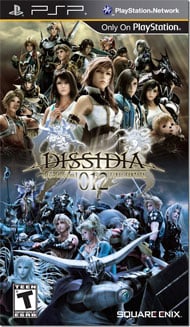
Dissidia 012 Final Fantasy Preview


Another Lineup of Epic Battles

by Lindsey Weedston
Crossover fighting games are all the rage right now, and nothing capitalized on the fad like Dissidia: Final Fantasy. Dissidia brought together everyone's favorite characters from the highly popular Final Fantasy franchise and pit them against each other in epic battles. The result was the best selling PSP game of 2009. So, it's no surprise that Square Enix is rolling out another one.
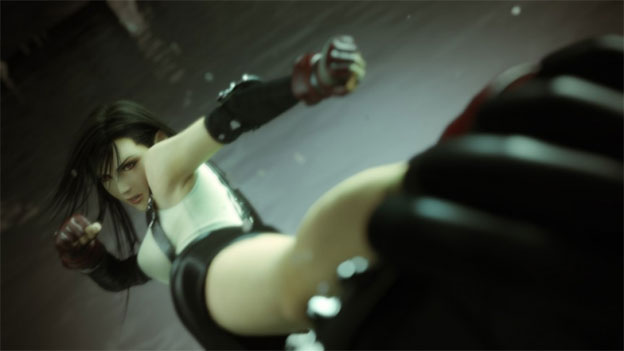
Dissidia 012 Final Fantasy (012 is pronounced Duodecim, although who knows how that's pronounced) is a prequel to the 2009 hit which will once again revolve around the battle between Cosmos and Chaos. Not much is known about the plot so far, but we do know is that there will be several new characters added to the cast of the original. Joining the ranks are Kain Highwind, Gilgamesh, Tifa Lockheart, Laguna Loire, Yuna, Prishe, Vaan, and Lightning. The new characters should add further variety to a game that was already overflowing with customization, and if Dissidia 012's story is like that of the original, it's likely to make the new game quite a bit longer.
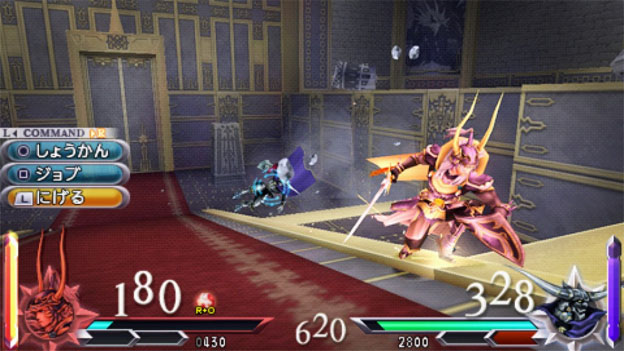
Square Enix is mixing things up a bit with the characters in this game. It seems that the lines of good and evil won't be as clear in Dissidia 012, as some protagonists and antagonists switch sides. Cloud, Terra, and Tidus—clear good guys in their respective games—will be on the side of Chaos, while Kuja and Jecht will be on the side of Cosmos. This could be due to some early-war moral confusion, and based on the lines drawn in the original game, we can expect that by the end of Dissidia 012, everyone will be back in their rightful place. It will also be possible to play on the side of Chaos, which should prove to be extremely awesome. The gameplay mechanics of Dissidia 012 will be similar to the original. There will still be Brave attacks and HP attacks, and the EX mode will be exactly the same as in the first game. What's new is the Assist Mode, wherein players can call upon allies to attack or defend them from opponents. With Assist Mode comes the Assist Gauge, which you build up by using Brave attacks. However, when a player uses an EX Burst, the Assist Gauge automatically drops to zero. This way the two modes balance each other out.


There will also be three countering systems: Assist Break, EX Break, and EX Revenge. An EX Break happens when the player interrupts the opponent's EX Mode with an Assist attack. EX Revenge occurs when a player is attacked while activating EX Mode, which slows down time for everything except the player. We can only hope the somewhat complicated technical aspects of the gameplay are better explained and executed in Dissidia 012 than they were in the original, otherwise the prequel could prove to be even more difficult to handle.

Another interesting change is found in story mode. Instead of a not-so-engaging chess-map style, players of Dissidia 012 will be able to explore an actual world map, Final Fantasy style. Screenshots show surprisingly detailed 3D landscapes where players can interact with other characters and encounter the Manikin baddies. There will be no towns in the world map, but there will be marked shops where players can pick up new gear and items. The original game will now come with Dissidia 012, updated with the world map and some new story elements. According to Tetsuya Nomura, playing both games will take about sixty hours.